

When we help clients build their MVPs, the most common question we hear isn’t “What should we include?” It’s “Are we missing something important?”
Here’s the thing: you probably are. But that’s not a bad thing.
We’ve worked on enough early-stage products to notice a pattern. The MVPs that actually work aren’t the ones packed with features. They’re the ones that dare to leave things out. And yes, it feels uncomfortable at first. You’ll second-guess yourself. Your stakeholders might push back. But that discomfort? It’s usually a sign you’re on the right track.
In this post, I’m walking you through the exact features we deliberately cut from our MVP’s features that seemed essential at the time and why leaving them out was one of the smartest decisions we made. If you’re in the middle of scoping your own MVP right now, this might save you weeks of wasted effort.
How We Decided What Not to Include in an MVP
Deciding what to build in an MVP is straightforward. Everyone has ideas. Everyone has opinions.
Deciding what not to include in an MVP is where real product thinking begins — and where most teams struggle.
Across multiple early-stage MVP builds, we’ve seen the same pattern repeat. Teams spend weeks debating features that feel important, impressive, or “expected,” only to realize later that those features slowed validation instead of enabling it.
An MVP doesn’t fail because it’s missing things.
It fails because it tries to do too much before it understands what actually matters.
Why MVP Scope Matters More Than Feature Count
Early-stage teams often measure progress by how much they ship. In reality, progress comes from MVP scope definition – how deliberately the product is constrained to answer one specific question.
At MVP stage, that question is simple:
Is this problem painful enough that users will adopt a solution?
Every feature added outside that goal increases risk:
- Longer build cycles
- Slower iteration
- Confusing feedback
- Internal disagreements over priorities
This is where MVP feature prioritization stops being opinion-based and becomes risk-based. A tightly scoped MVP creates clean signals. A bloated one creates noise. Feature count is irrelevant if the scope is unclear.
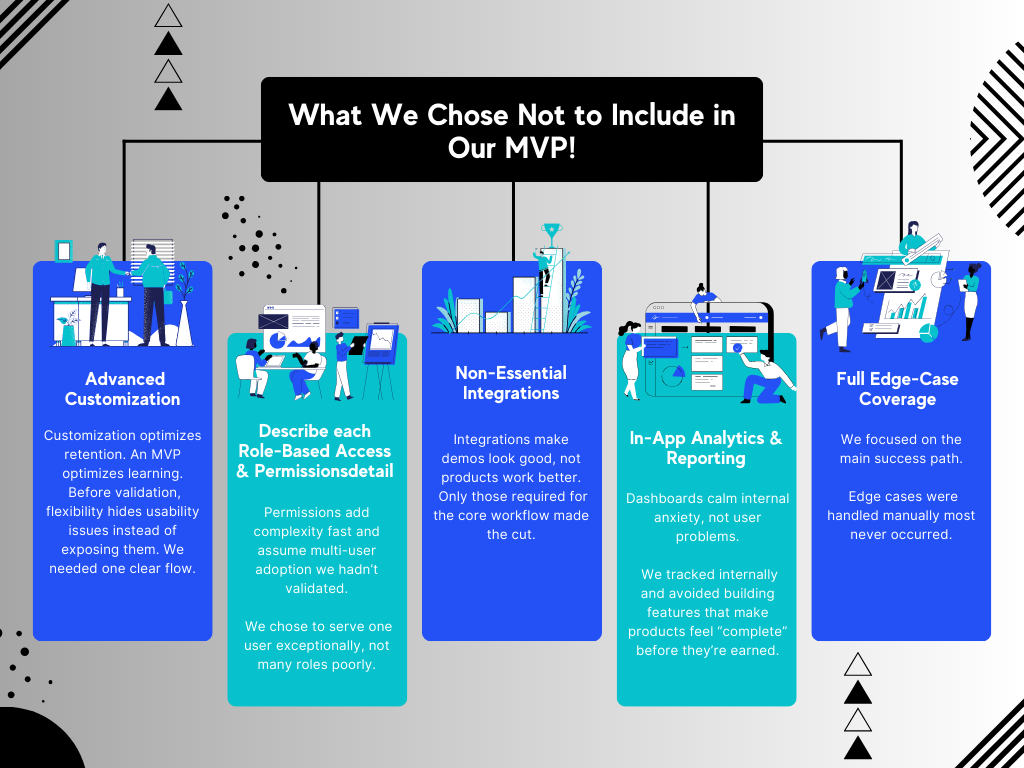
What We Chose Not to Include in Our MVP
These were not theoretical decisions. In several cases, these features were requested by stakeholders – and we still said no.
1. Advanced Customization and Settings
Custom workflows, dashboards, and preference panels were all proposed early.
We cut them.
Customization optimizes for retention. An MVP optimizes for learning.
Before validation, flexibility hides usability problems instead of exposing them. We had to observe how users reacted with a singular flow rather than provide users with a means to get around that flow
2. Role-Based Access and Permissions
Permissions systems look “enterprise-ready,” but they introduce complexity fast:
- Edge cases multiply
- QA scope expands
- Product decisions slow down
More importantly, permissions assume multi-user adoption — something we hadn’t yet validated. In MVP feature ranking, we chose to serve one user supremely rather than several roles inadequately.
3. Non-Essential Integrations
Integrations often make demos look impressive. That alone is not a reason to build them.
We only included integrations that were required for the core workflow to function. Everything else stayed out. External dependencies reduce flexibility, and before validation, flexibility matters more than polish.
4. In-App Analytics & Reporting
The dashboard and report features allow internal teams to feel in control of the data. However, people who started with dashboards rarely require this functionality. Internal activity was tracked and managed by hand. Building reporting early would have satisfied internal anxiety, not user demand.
This is one of the most common MVP mistakes startups make when rushing to look “complete” before the product has earned it.
5. Full Edge-Case Coverage
“We didn’t try to tackle every possible problem,”
The MVP targeted the main success path. When edge cases came up, we tackled them manually. Most edge cases did not happen. It would take too long if the project tried to cover every possible learning path.
The Risk of Feature Creep in MVPs
Feature creep doesn’t come from bad intentions.
It comes from fear:
- 1.Fear of user rejection
- 2.A fear of incompleteness
- 3. Fear of stakeholder backlash
Complexity is not the problem; it is a problem of diluted validation. If the MVP is trying to do too many things, it makes it difficult for the team to comprehend why users react to it the way that they do.
What We Focused on Instead
Instead of breadth, we committed to a narrow set of minimum viable product features that supported one core job-to-be-done.
Our priorities were simple:
- One primary workflow
- One measurable outcome
- One assumption to validate
This clarity made how to prioritize MVP features obvious. If a feature didn’t directly reduce uncertainty around the core assumption, it didn’t make the cut.
That discipline is central to lean MVP development – not moving fast for the sake of speed, but moving deliberately to learn faster.
Key Takeaways for Founders
If you are dealing with an MVP, you might learn these lessons:
- MVP scope definition is a strategic choice, not a technical one
- Features that improve polish, scale, or flexibility can wait
- Saying no early prevents months of rework later
- Manual processes are acceptable in MVPs; complexity is not
- If you’re unsure how to prioritize MVP features, start by identifying which decision removes the most uncertainty
An MVP is not a smaller version of your final product.
It’s a focused experiment designed to remove uncertainty.
Fazit
The addition of the CRM system to the MVP is not a sales optimization tool. It is a matter of retaining the insight.
Right CRM functionalities in the MVP allow you to:
- Remember users
- Feedback should be linked to decision-making
- Learn quickly without slowing down the product
In any case, whether it is a lightweight CRM, an MVP with a built-in CRM, or a delay integration, the following applies:
A CRM system needs to enhance learning. It needs to simplify things. It needs to scale after the signal becomes real.












 German
  English